FreshRSS

🔒
❌ About FreshRSS
There are new articles available, click to refresh the page.
Before yesterdayThe Thunderbird Blog

Mobile Progress Report – June 2025

14 July 2025 at 17:33

Welcome back to another update on how things are going on mobile. 

Thunderbird for iOS

We’ve been going back and forth between database and JMAP for Thunderbird for iOS. Most of the visible work has flown into creating an initial JMAP library that we can use to access the parts that we need from Thunderbird for iOS. This work will continue into July as well. Progress so far means making JSON requests and parsing responses and making standard get/set/query requests. There is support for working with sessions as well.

In July we’ll have a few things to show for viewing actual folders and email messages. Very preliminary, but already quite some progress! I’m almost tempted to post the screenshots now but I’ll wait until next month. We’ll also be releasing a new (currently still internal) Testflight version when everything has landed.

Thunderbird for Android

We want to make Thunderbird for Android more accessible to contributors and improve some of our documentation. Part of that is our brand new testing guide which talks about which testing patterns to use, how to adhere to our naming conventions and some guidelines around fakes vs mocks. We’ve recently been talking about making more use of the Maestro testing framework, as it makes it very simple to add tests even for folks without engineering experience. 

Further we’ve made some strides on our overall architecture documentation. If you’ve been reluctant to contribute because of the learning curve, this might be your chance to make another attempt. Even if you are an existing contributor, we believe the docs will help you understand the codebase a bit better. Let us know what you think, if you see a way that our documentation can be improved go ahead and file an issue.

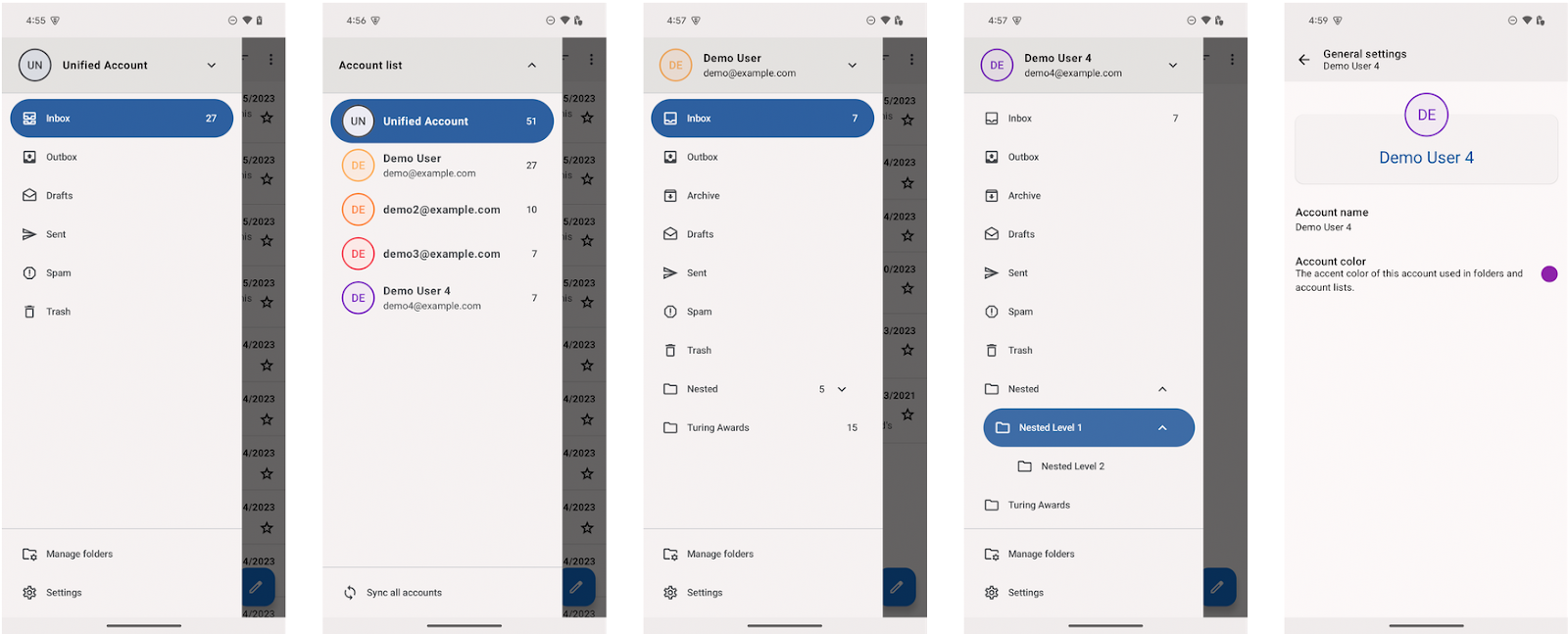
Next up, we’re nearing the end of the drawer updates we’ve been working on. We know a bunch of folks weren’t very happy with the navigation rail given the extra horizontal space it uses, and it being unclear which account you actually have selected. We’re returning the account selector to the top, and sporting a separate “Unified Account” where you can find not just your unified inbox, but also some other unified folders. If you’ve set up custom unified folders previously these will appear there as well. 

Additional updates

  • Ashley has worked on sync debug tooling so we can get a better understanding of any issues related to emails not arriving in time.
  • Jan has switched the EHLO string from 127.0.0.1 to ehlo.thunderbird.net to increase compatibility with email servers that don’t accept 127.0.0.1.
  • João has improved accessibility of the contact pictures in the message view, and fixed an issue where the “Download Complete Message” button was hidden by the navigation bar.
  • Rafael has been working on the foundations of in-app error notifications. He improved swiping actions for when the account does not have an archive folder set, to avoid surprises. Through this work a bunch of files have been migrated from Java to Kotlin, great work!
  • Stefan has fixed an issue where some I/O errors were not correctly caught. I’m particularly excited about this since it smooths over the situation where you change from one network to the next, so that push email will arrive a little more reliably.
  • Wolf has revamped some of our internal logging support to be more consistent. We really don’t need multiple different loggers and might want to change the implementation once in a while 🙂 There has also been a bunch of Java/Kotlin conversion going on, and some refactoring in the local search code. Above mentioned work on the drawer and documentation was also Wolf’s work. 
  • Shamim continues to rock the refactoring. By far the most Java to Kotlin conversion, fixing a crash when adding an account after removal, making threaded view update correctly when in the message list. Notably, the [Gmail] folder placeholder is now no longer visible, you’ll see the subfolders directly.


Philipp Kewisch (he/him)
Thunderbird Mobile Engineering | Mozilla Thunderbird
thunderbird.net

The post Mobile Progress Report – June 2025 appeared first on The Thunderbird Blog.

Thunderbird Mobile Progress Report: May 2025

20 June 2025 at 17:47

Thunderbird for iOS

We’re growing a few more stars! We’re so happy to hear there is great interest in Thunderbird for iOS, and hope to reach a stage soon where you all can be more involved. Thank you, also, to those of you who’ve submitted an increasing number of ideas via Mozilla Connect.

Todd has been preparing the JMAP implementation for iOS, which will allow us to test the app with real data. We’re exploring the possibility of releasing the first community TestFlight a bit earlier by working directly with in-memory live data instead of syncing everything to a database upfront. The app may crash if your inbox has 30GB of email, but this approach should help us iterate more quickly. We still believe offline-first is the right path, and designing a database that supports this will follow soon after.

Further we’ve set up the initial localization infrastructure. This was surprisingly easy using Weblate’s translation propagation feature. We simply needed to add a new component to our Android localization project that pulls from the iOS repository. While Weblate doesn’t (yet?) auto-propagate when the component is set up, if there are changes across iOS and Android in the future, the strings will automatically apply to both products. 

Thunderbird for Android

We spent a lot of time thinking about the beta and making adjustments. Fast forward to June, we’re still experiencing a number of crashes. If you are running the beta, please report crashes and try to find out how to trigger them. If you are not using Beta, please give it a try and report back on the beta list or issue tracker. We’d greatly appreciate it! Here are a few updates worth noting for the month of May:

  • Some folks on beta may have noticed the “recipient field contains incomplete input” error which kept you from sending emails. We’ve noticed as well, and halted the rollout of 11.0b1 on app stores where supported. Shamim fixed this issue for 11.0b2.
  • Another important issue was when attaching multiple issues, only one image would be attached. This happens all the way back to 10.0, and we’ll release a 10.1 that includes this fix. Again thank you to Shamim!
  • Final round of fixes from Shamim: new mail notifications can be disabled again, we have a bunch of new tests and refactoring, we have a few new UI types for the new preference system that Wolf created.
  • Timur Erofeev solved a crash on Android 7 due to some library changes in dependency updates we didn’t anticipate
  • Wolf is getting closer to finishing the drawer updates that we’re excited to share in a beta soon. He has also been working diligently to remove some of the crashes we’ve been experiencing on beta due to the new drawer and some of the legacy code it needs to fall back to. Finally, as we’re venturing into Thunderbird for iOS, Wolf has been thinking about the KMP (Kotlin Multiplatform) approach and added support to the Thunderbird for Android repository. He will soon separate a simple component and set things up so we can re-use it from Thunderbird for iOS.
  • Rafael and Marcos have fixed some issues with the system bar appearing transparent. The issue has been very persistent, we’re still getting reports of cases where this isn’t yet resolved.
  • Philipp has fixed an issue for our release automation to make sure the changelog doesn’t break on HTML entities.

I also wanted to highlight the new Git Commit Guide that Wolf created to give us a little more stability in our commits and set expectations for pull requests. We have a few more docs coming up in June, stay tuned. 

You could be on this list next month, please get in touch if you’d like to help out!


Philipp Kewisch (he/him)
Thunderbird Mobile Engineering | Mozilla Thunderbird

The post Thunderbird Mobile Progress Report: May 2025 appeared first on The Thunderbird Blog.

Thunderbird for Mobile April 2025 Progress Report

15 May 2025 at 17:26

Here is an update of what Thunderbird’s mobile community has been up to in April 2025. With a new team member, we’re getting Thunderbird for iOS out in the open and continuing to work on release feedback from Thunderbird for Android.

The Team is Growing

Last month we introduced Todd and Ashley to the MZLA mobile team, and now we have another new face in the team! Rafael Tonholo joins us as a Senior Android Engineer to focus on Thunderbird for Android. He also has much experience with Kotlin Multiplatform, which will be beneficial for Thunderbird for iOS as well.

Thunderbird for iOS

We’ve published the initial repository of Thunderbird for iOS! The application doesn’t really do a lot right this moment, since we intend to work very incrementally and start in the open. You’ll see a familiar welcome screen, slightly nicer than Thunderbird for Android and have the opportunity to make a financial contribution.

Testflight Distribution

We’re planning to distribute Thunderbird for iOS through TestFlight. To support that, we’ve set up an Apple Developer account and completed the required verification steps.

Unlike Android, where we maintain separate release and beta versions, the iOS App Store will have a single “Thunderbird” app. Apple prefers not to list beta versions as separate apps, and their review process tends to be stricter. Once the main app is published, we’ll be able to use TestFlight to offer a beta channel.

Before the App Store listing goes live, we’ll use TestFlight to distribute our builds. Apple provides an internal TestFlight option that doesn’t require a review, but it only works if testers have access to the developer account. That makes it unsuitable for community testing.

Initial Features for the Public Testflight Alpha

To share a public TestFlight link, we need to pass an initial App Store review. Apple expects apps to meet a minimum bar for functionality, so we can’t publish something like a simple welcome screen. Our goal for the first public TestFlight build is to support manual account setup and display emails in the inbox. Here are the specifics:

  • Initial account setup will be manual with hostname/username/password.
  • There will be a simple message list that will only show the INBOX folder messages, with a sender, subject, and maybe 2–3 preview lines.
  • You’ll have the opportunity to pull to refresh your inbox.

That is certainly not what you’d call a fully functional email client, but it could qualify for bare minimum functionality required for the Apple review. We have more details and a feature comparison in this document.

In other exciting news, we’re going to build Thunderbird for iOS with JMAP support first and foremost. While support on the email provider side is limited, we start with a modern email stack. This will allow us to build towards some of the features that email from the late 80’s was missing. We’ll be designing the code architecture in a way that adding IMAP support is very simple, so it will ideally follow soon after.

iOS Release Engineering and Localization

We’ve also gone through a few initial conversations on what the release workflow might look like. We’re currently deciding between:

  • GitHub Actions with Upload Actions (Pro: very open, re-use of some work on the Thunderbird for Android side. Con: Custom work, not many well-supported upload actions)
  • GitHub Actions with Fastlane (Pro: very open, well-supported, uses the same listing metadata structure we already have on Android. Con: Ruby as yet another language, no prior releng work)
  • Xcode Cloud (Pro: built in to Xcode, easy to configure, we’ll probably get by with the free tier for quite some time. Con: Not very open, increasing build cost)
  • Bitrise (Pro: Easy to configure, used by Firefox for iOS, we’ll get some support from Mozilla on this. Con: Can be pricy, not very open)

For now, our release process is pressing a button every once in a while. Xcode makes this very easy, which gives the release operations more time to plan a solution.

For localization, we’re aiming to use Weblate, just as Thunderbird for Android. The strings will mostly be the same, so we don’t need to ask our localizers to do double work.

Thunderbird for Android

We’re still focusing on release feedback by working on the drawer and looking to improve stability. April has very much been focused on onboarding the new team. I’ll keep the updates in this section a bit more brief, as we have less to explore and more to fix 🙂

  • We’ve accepted a new ADR to change the shared modules package from app.k9mail and com.fsck to net.thunderbird. We’ll be doing this gradually when migrating over legacy code.
  • Ashley has fixed a few keyboard accessibility issues to get started. She has also resolved a crash related to duplicate folder ids in the drawer. Her next projects are improving our sync debug tooling and other projects to resolve stability issues in retrieving emails.
  • Clément Rivière added initial support for showing hierarchical folders. The work is behind a feature flag for now, as we need to do some additional refactoring and crash fixes before we can release it. You can however try it out on the beta channel.
  • Fishkin removed a deprecated progress indicator, which provides slightly better support for Android watches.
  • Rafael fixed an issue related to Outlook/Microsoft accounts. If you have received the “Authentication Unsuccessful” message in the past, please try again on our beta channel.
  • Shamim continues on his path to refactor and move over some of our legacy code into the new modular structure. He also added support to attach files from the camera, and has resolved an issue in the drawer where the wrong folder was selected.
  • Timur Erofeev added support for algorithmic darkening where supported. This makes dark mode work better for a wider range of emails, following the same method that is used on web pages.
  • Wolf has been working diligently to improve our settings and drawer infrastructure. He took a number of much needed detours to refactor legacy code, which will make future work easier. Most notably,  we have a new settings system based on Jetpack Compose, where we will eventually migrate all the settings screens to.

That’s a wrap for April! Let us know if you have comments, or see opportunities to help out. See you soon!

The post Thunderbird for Mobile April 2025 Progress Report appeared first on The Thunderbird Blog.

Thunderbird for Android March 2025 Progress Report

10 April 2025 at 19:06

Hello, everyone, and welcome to the Thunderbird for Android March 2025 Progress Report. We’re keeping our community updated on everything that’s been happening in the Android team, which is quickly becoming a more general mobile team with some recent hires. In addition to team news, we’re talking about our roadmap board on GitHub.

Team Changes

In March we said goodbye to cketti, the K-9 Mail maintainer who joined the team when Thunderbird first announced plans for an Android app. We’re very grateful for everything he’s created, and for his trust that K-9 Mail and Thunderbird for Android are in good hands. But we also said hello to Todd Heasley, our new iOS engineer, who started March 26. We also have just added Ashley Soucar, an Android/iOS engineer, who joined us on April 7. If all continues to go well, we’ll also be adding another Android engineer in the next couple of weeks.

Our Roadmap Board

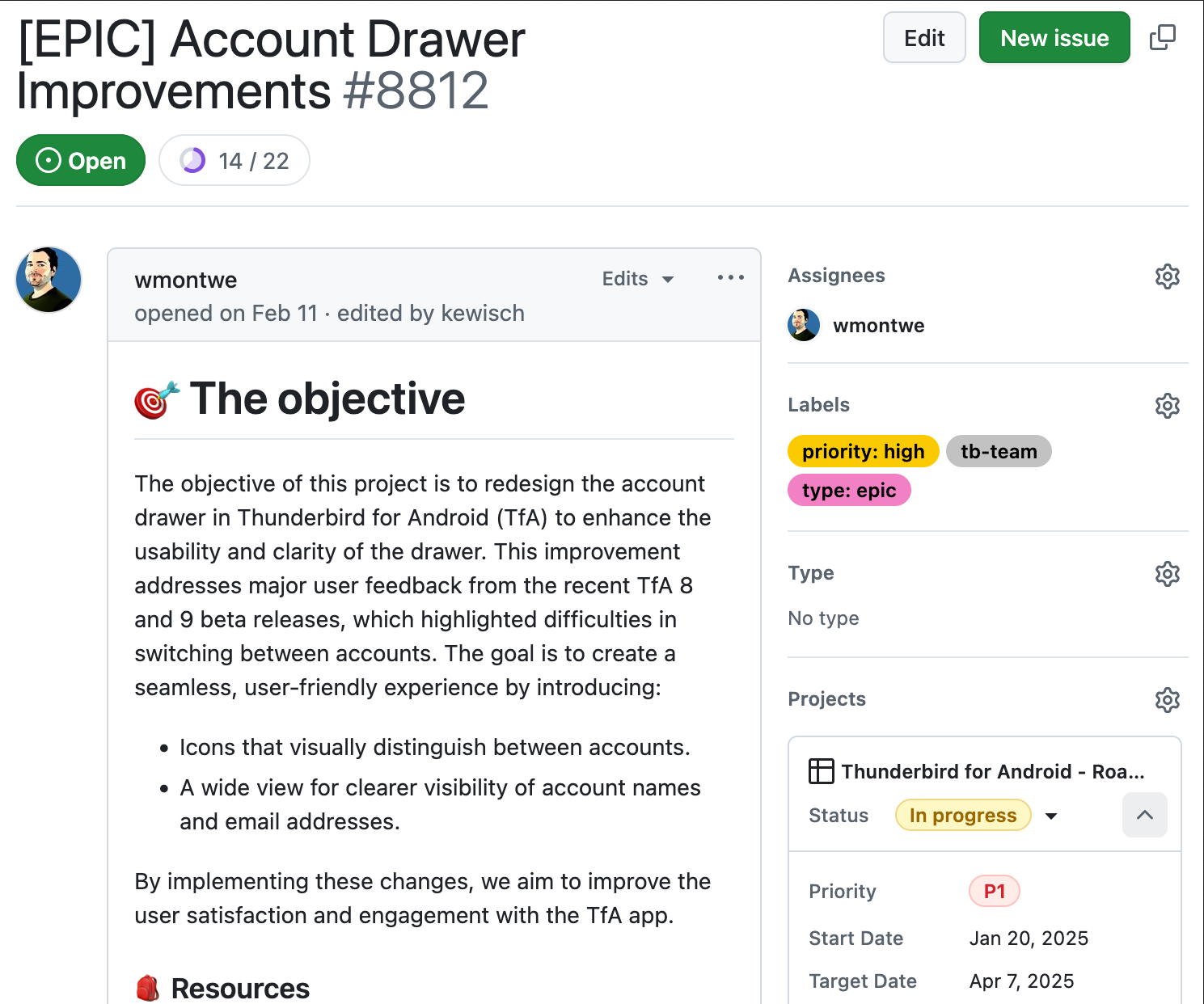
Our roadmap board is now available! We’re grateful to the Council for their trust and support in approving it. As the board will reflect any changes in our planning, this is the most up-to-date source for our upcoming development. Each epic will show its objective and what’s in scope – and as importantly, what’s out of scope. The project information on the side will tell you if an epic is in the backlog or work in progress.

If you’d like to know what we’re working on right now, check out our sprint board.

Contribute by Triaging GitHub Issues

One way to contribute to Thunderbird for Android is by triaging open GitHub Issues. In March, we did a major triage with over 150 issues closed as duplicates, marked with ‘works for me,’ or elevating them up to the efforts and features described in the roadmap above. Especially since we’re a small team, triaging issues helps us know where to act on incoming issues. This is a great way to get started as a Thunderbird for Android contributor.


To start triaging bugs, have a look at the ‘unconfirmed’ issues. Try to reproduce the issue  to help verify that the issue exists. Then add a comment with your results and any other information you found that might help narrow down the issue. If you see users generally saying “it doesn’t work”, ask them for more details or to enable logs. This way we know when to remove the unconfirmed label. If you have questions along the way or need someone to confirm a thought you had, feel free to ask in the community support channel.

Account Drawer

Our main engineering focus in March has been the account drawer we shared screenshots on in the January/February update. Given the settings design includes a few non-standard components, we took the opportunity to write a modern settings framework based on Jetpack Compose and make use of it for the new drawer. There will be some opportunities to contribute here in the future, as we’d like to migrate our old settings UI to the new system.

We have a few crashes and rough edges to polish, but are very close to enabling the feature flag in beta. If you aren’t already using it and want to get early access, install our beta today.

I’d also like to call out a pull request by Clément, who contributed support for a folder hierarchy. The amazing thing here—our design folks were working out a proposal because we were interested in this as well, and without knowing, Clément came up with the same idea and came in with a pull request that really hit the spot. Great work!

Community Contributions

In addition to the folder hierarchy mentioned above, here are a few community activities in March:

  • Shamim made sure the Unified Inbox shows up when you add your second account, retained scroll position in the drawer when rotating, removed font size customizations in favor of Android OS controls, flipped the default for being notified about new email and helped out with a few refactorings to make our codebase more modern.
  • Sergio has improved back button navigation when editing drafts.
  • Salkinnoma made our workflow runs more efficient and fixed an issue in the find folders view where a menu item was incorrectly shown.
  • Smatek improved our edge to edge support by making the bottom Android navigation bar background transparent
  • Husain fixed some inconsistencies when toggling “Show Unified Inbox”.
  • Vayun has begun work to update the Thunderbird for Android app widgets to Jetpack compose (including dark theming)
  • SttApollo has made the logo size more dynamic in the onboarding screen.

This is quite a list, great work! When you think about Thunderbird for Android or K-9 Mail, what was the last major annoyance you stumbled upon? If you are an Android developer, now is a good time to fix it. You’ll see your name up here next time as well 🙂

The post Thunderbird for Android March 2025 Progress Report appeared first on The Thunderbird Blog.

Thunderbird for Android January/February 2025 Progress Report

6 March 2025 at 17:12

Hello, everyone, and welcome to the first Android Progress Report of 2025. We’re ready to hit the ground running improving Thunderbird for Android experience for all of our users. Our January/February update involves a look at improvements to the account drawer and folders on our roadmap, an update on Google and K-9 Mail, and explores our first step towards Thunderbird on iOS.

Account Drawer Improvements

As we noted in our last post on the blog, improving the account drawer experience is one of our top priorities for development in 2025. We heard your feedback and want to make sure we provide an account drawer that lets you navigate between accounts easily and efficiently. Let’s briefly go into the most common feedback:

  • The accounts on the same domains or with similar names are difficult to distinguish from the two letters provided.
  • It isn’t clear how the account name influences the initials.
  • The icons seemed to be jumping around, especially obvious with 3–5 accounts.
  • There is a lot of spacing in the new drawer.
  • Users would like more customization options, such as an account picture or icon.
  • Some users would like to see a broader view that shows the whole account name.
  • With just one account, the accounts sidebar isn’t very useful.

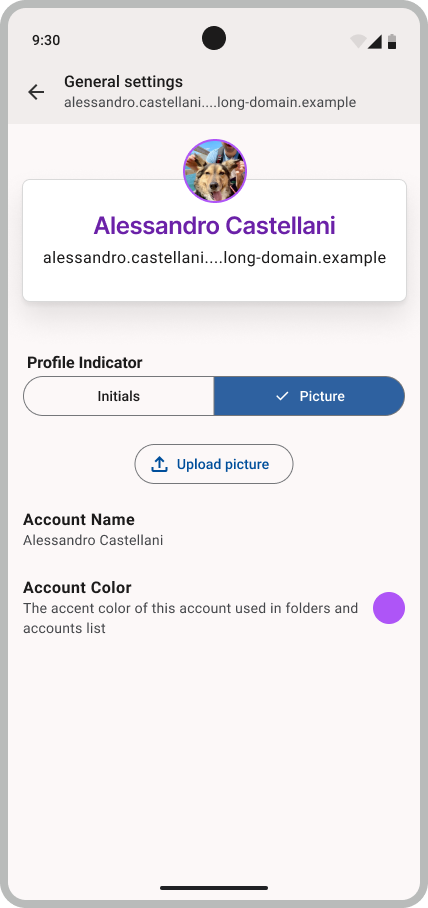
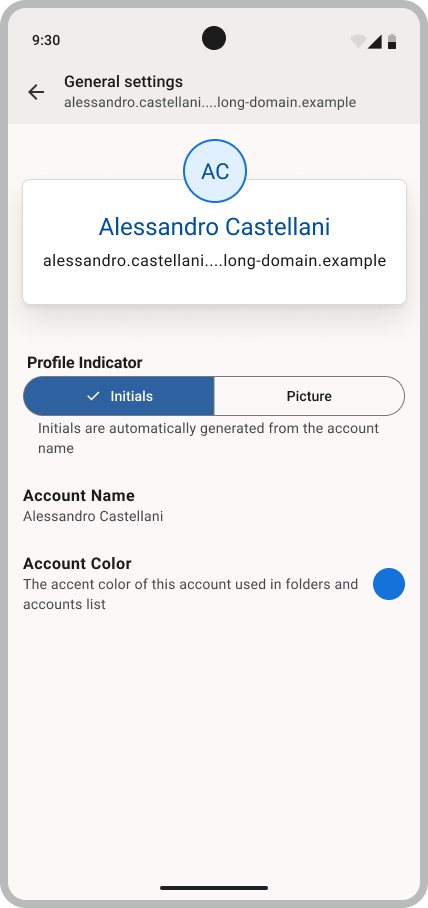
Our design folks are working on some mockups on where the journey is taking us. We’re going to share them on the beta topicbox where you can provide more targeted feedback, but for a sneak peek here is a medium-fidelity mockup of what the new drawer and settings could look like:

On the technical side, we’ve integrated an image loader for the upcoming pictures. We now need to gradually adapt the mockups. We will begin with the settings screen changes and then adapt the drawer itself to follow.

Notifications and Error States

Some of you had the feeling your email was not arriving quick enough. While email delivery is reliable, there are a few settings in Thunderbird for Android and K-9 mail that aren’t obvious leading to confusion. When permissions are not granted, functionality is simply turned off instead of telling the user they actually need to grant the alarms permission for us to do a regular sync. Or maybe the sync interval is simply set to the default of 1 hour.

We’re still in the process of mapping out the best experience here, but will have more updates soon. See the notifications support article in case you are experiencing issues. A few things we’re aiming for this year:

  • Show an indicator in foreground service notification when push isn’t working for all configured folders
  • Show more detailed information when foreground service notification is tapped
  • Move most error messages from the system notifications to an area in-app to clearly identify when there is an error
  • Make authentication errors, certificate errors, and persistent connectivity issues use the new in-app mechanism
  • Make the folder synchronization settings more clear (ever wondered why there is “sync” and “push” and if you should have both enabled or not?)
  • Prompt for permissions when they are needed, such as aforementioned alarms permission
  • Indicate to the user if permissions are missing for their folder settings.
  • Better debug tool in case of notification issues.

Road(map) to the Highway

Our roadmap is currently under review from the Thunderbird council. Once we have their final approval, we’ll update the roadmap documentation. While we’re waiting, we would like to share some of the items we’ve proposed:

  • Listening to community feedback on Mozilla Connect and implementing HTML signatures and quick filter actions, similar to the Thunderbird Desktop
  • Backend refactoring work on the messages database to improve synchronization
  • Improving the message display so that you’ll see fewer prompts to download additional messages
  • Adding Android 15 compatibility, which is mainly Edge to Edge support
  • Improving the QR code import defaults (relates to notification settings as well)
  • Making better product decisions by (re-)introducing a limited amount of opt-in telemetry.

Does that sound exciting to you? Would you like to be a part of this but don’t feel you have the time? Are you good at writing Android apps in Kotlin and have an interest in muti-platform work? Well, do I have a treat for you! We’re hiring an Android Senior Software Engineer to work on Thunderbird for Android!

K-9 Mail Blocked from Gmail

We briefly touched on this in the last update as well: some of our users on K-9 Mail have noticed issues with an “App Blocked” error when trying to log into certain Gmail accounts. Google is asking K-9 Mail to go through a new verification process and has introduced some additional requirements that were not needed before. Users that are already logged in or have logged in recently should not be affected currently.

Meeting these requirements depended on several factors beyond our control, so we weren’t able to resolve this immediately.

If you are experiencing this issue on K-9 Mail, the quickest workaround is to migrate to Thunderbird for Android, or check out one of the other options on the support page. For those interested, more technical details can be found in issue 8598. We’re using keys on this application that have so far not been blocked. Our account import feature will make this transition pretty seamless. 

We’ve been able to make some major progress on this, we have a vendor for the required CASA review and expect the letter of validation to be shared soon. We’re still hitting a wall with Google, as they are giving us inconsistent information on the state of the review, and making some requirements on the privacy policy that sound more like they are intended for web apps. We’ve made an effort to clarify this further and hope that Google will accept our revised policy.

If all goes well we’ll get approval by the end of the month, and then need to make some changes to the key distribution so that Thunderbird and K-9 use the intended keys. 

Our Plans for Thunderbird on iOS

If you watched the Thunderbird Community Office Hours for January, you might have noticed us talking about iOS. You heard right – our plans for the Thunderbird iOS app are getting underway! We’ve been working on some basic architectural decisions and plan to publish a barebones repository on GitHub soon. You can expect a readme and some basic tools, but the real work will begin when we’ve hired a Senior Software Engineer who will lead development of a Thunderbird app for the iPhone and iPad. Interviews for some candidates have started and we wish them all the best!

With this upcoming hire, we plan to have alpha code available on Test Flight by the end of the year. To set expectations up front, functionality will be quite basic. A lof of work goes into writing an email application from scratch. We’re going to be focusing on a basic display of email messages, and then expanding to triage actions. Sending basic emails is also on our list.

FOSDEM

Our team recently attended FOSDEM in Brussels, Belgium. For those unfamiliar with FOSDEM, it’s the Free and Open Source Software Developers’ European Meeting—an event where many open-source enthusiasts come together to connect, share knowledge and ideas, and showcase the projects they’re passionate about.

We received a lot of valuable feedback from the community on Thunderbird for Android. Some key areas of feedback included the need for Exchange support, improvements to the folder drawer, performance enhancements, push notifications (and some confusion around their functionality), and much more.

Our team was highly engaged in listening to this feedback, and we will take all of it into account as we plan our future roadmap. Thunderbird has always been a project developed in tandem with our community and it was exciting for us to be at FOSDEM to connect with our users, contributors and friends.

In other news…

As always, you can join our Android-related mailing lists on TopicBox. And if you want to help us test new features, you can become a beta tester.

This blog post talks a lot about the exciting things we have planned for 2025. We’re also hiring for two positions, and may have a third one later in the year. While our software is free and open source, creating a world class email application isn’t without a cost. If you haven’t already made a contribution in January,  please consider supporting our work with a financial contribution. Thunderbird for Android relies entirely on user funding, so without your support we could likely only get to a fraction of what you see here. Making a contribution is really easy if you have Thunderbird for Android or K-9 Mail installed, just head over to the settings and sign up directly from your device. 

See you next month,

The post Thunderbird for Android January/February 2025 Progress Report appeared first on The Thunderbird Blog.


❌