
 FreshRSS


If your organization uses Microsoft Exchange-based email, you’ll be happy to hear that Thunderbird’s latest monthly Release version 145, now officially supports native access via the Exchange Web Services (EWS) protocol. With EWS now built directly into Thunderbird, a third-party add-on is no longer required for email functionality. Calendar and address book support for Exchange accounts remain on the roadmap, but email integration is here and ready to use!
What changes for Thunderbird users
Until now, Thunderbird users in Exchange hosted environments often relied on IMAP/POP protocols or third-party extensions. With full native Exchange support for email, Thunderbird now works more seamlessly in Exchange environments, including full folder listings, message synchronization, folder management both locally and on the server, attachment handling, and more. This simplifies life for users who depend on Exchange for email but prefer Thunderbird as their client.
How to get started
For many people switching from Outlook to Thunderbird, the most common setup involves Microsoft-hosted Exchange accounts such as Microsoft 365 or Office 365. Thunderbird now uses Microsoft’s standard sign-in process (OAuth2) and automatically detects your account settings, so you can start using your email right away without any extra setup.
If this applies to you, setup is straightforward:
- Create a new account in Thunderbird 145 or newer.
- In the new Account Hub, select Exchange (or Exchange Web Services in legacy setup).
- Let Thunderbird handle the rest!
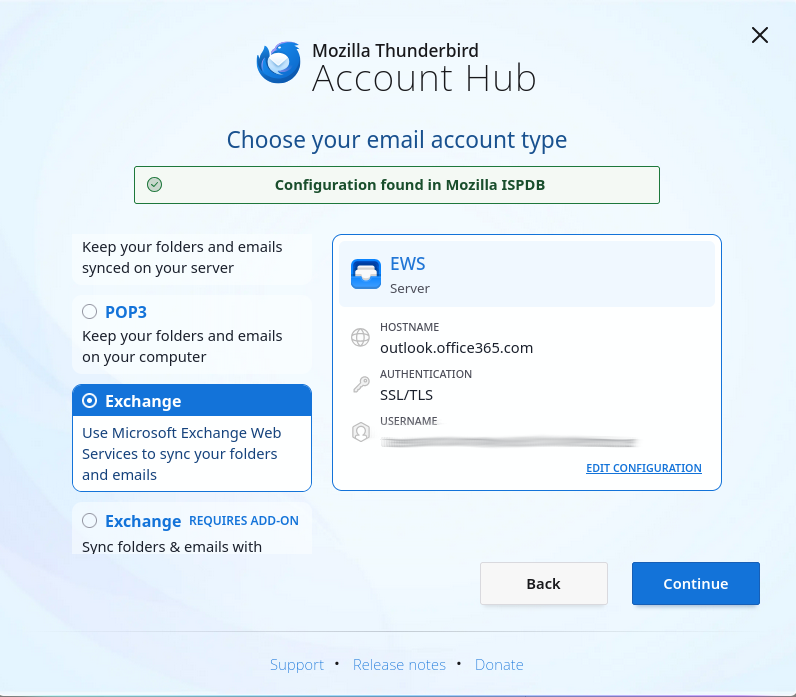
Important note: If you see something different, or need more details or advice, please see our support page and wiki page. Also, some authentication configurations are not supported yet and you may need to wait for a further update that expands compatibility, please refer to the table below for more details.
What functionality is supported now and what’s coming soon
As mentioned earlier, EWS support in version 145 currently enables email functionality only. Calendar and address book integration are in active development and will be added in future releases. The chart below provides an at-a-glance view of what’s supported today.
| Feature area | Supported now | Not yet supported |
| Email – account setup & folder access | Creating accounts via auto-config with EWS, server-side folder manipulation | – |
| Email – message operations | Viewing messages, sending, replying/forwarding, moving/copying/deleting | – |
| Email – attachments | Attachments can be saved and displayed with detach/delete support. | – |
| Search & filtering | Search subject and body, quick filtering | Filter actions requiring full body content are not yet supported. |
| Accounts hosted on Microsoft 365 | Domains using the standard Microsoft OAuth2 endpoint | Domains requiring custom OAuth2 application and tenant IDs will be supported in the future. |
| Accounts hosted on-premise | Password-based Basic authentication | Password-based NTLM authentication and OAuth2 for on-premise servers are on the roadmap. |
| Calendar support | – | Not yet implemented – calendar syncing is on the roadmap. |
| Address book / contacts support | – | Not yet implemented – address book support is on the roadmap. |
| Microsoft Graph support | – | Not yet implemented – Microsoft Graph integration will be added in the future. |
Exchange Web Services and Microsoft Graph
While many people and organizations still rely on Exchange Web Services (EWS), Microsoft has begun gradually phasing it out in favor of a newer, more modern interface called Microsoft Graph. Microsoft has stated that EWS will continue to be supported for the foreseeable future, but over time, Microsoft Graph will become the primary way to connect to Microsoft 365 services.
Because EWS remains widely used today, we wanted to ensure full support for it first to ensure compatibility for existing users. At the same time, we’re actively working to add support for Microsoft Graph, so Thunderbird will be ready as Microsoft transitions to its new standard.
Looking ahead
While Exchange email is available now, calendar and address book integration is on the way, bringing Thunderbird closer to being a complete solution for Exchange users. For many people, having reliable email access is the most important step, but if you depend on calendar and contact synchronization, we’re working hard to bring this to Thunderbird in the near future, making Thunderbird a strong alternative to Outlook.
Keep an eye on future releases for additional support and integrations, but in the meantime, enjoy a smoother Exchange email experience within your favorite email client!
If you want to know more about Exchange support in Thunderbird, please refer to the dedicated page on support.mozilla.org. Organization admins can also find out more on the Mozilla wiki page. To follow ongoing and future work in this area, please refer to the relevant meta-bug on Bugzilla.
The post Thunderbird Adds Native Microsoft Exchange Email Support appeared first on The Thunderbird Blog.

