
FreshRSS

πŸ”’
❌ About FreshRSS
There are new articles available, click to refresh the page.
Before yesterdaySoftware

Community Office Hours: A Thundermail Update

14 July 2026 at 22:36

Our Community Office Hours series is all about connecting with the people behind Thunderbird and our products, and sharing the work that’s happening behind the scenes. These conversations are a chance to learn more about the direction of our projects and to hear directly from the people making it happen.

In this episode, we are talking about Thundermail!

Since we first shared our plans for Thundermail, we have seen an incredible amount of excitement, curiosity, and thoughtful feedback from the community of early bird testers. In this Community Office Hours session, members of the Thunderbird team sit down to talk about the project’s vision, share where things stand today, and answer some of the questions we’ve been getting along the way.

In this conversation, you’ll hear about:

  • Progress since the initial announcement of Thunderbird Pro and Thundermail
  • Many of the community’s questions submitted via Reddit.
  • What we’re working on next and what you can expect in the months ahead.

One of the best parts of Community Office Hours is the opportunity to have open conversations with our community. Your questions, ideas, and feedback help shape Thunderbird and its products, and we are excited to keep sharing updates as Thundermail continues to evolve.

Resources

Resources for Suggesting Features:

Thunderbird on Desktop and Mobile – https://connect.mozilla.org

Thundermail and Thunderbird Pro – https://ideas.tb.pro

Resources for diving into Thundermail:

Thundermail (and other services) roadmap: https://roadmaps.thunderbird.net/en-US/services/

Subreddit: https://www.reddit.com/r/ThunderbirdPro/

Thunderbird Pro addon repo that is now shipped natively in Thunderbird: https://github.com/thunderbird/tbpro-add-on

Thunderbird Accounts repo: https://github.com/thunderbird/thunderbird-accounts

Webmail client repo: https://github.com/thunderbird/stormbox

Appointment repo: https://github.com/thunderbird/appointment

Thundermail deployment repo: https://github.com/thunderbird/thundermail-deploy

SieveConnect repo: https://github.com/philpennock/sieve-connect

Resources for Getting Help with Thunderbird:

Thunderbird for Android Support Channel (Matrix) – https://matrix.to/#/#tb-android:mozilla.org

Thunderbird Desktop Support Channel (Matrix) – https://matrix.to/#/#thunderbird:mozilla.org

The post Community Office Hours: A Thundermail Update appeared first on The Thunderbird Blog.
Introducing our Public Roadmaps

19 March 2026 at 21:26

At Thunderbird, we firmly believe in the strength of listening to our community’s needs and wants, and balancing it with our resources and capabilities. While this has always been part of our ethos, we want to start 2026 by making our goals easier to read and comprehend at roadmaps.thunderbird.net, where you will find our roadmaps for our Services and both the Thunderbird Desktop and Mobile products.

To better serve our community, we are making several thoughtful updates to how we build and communicate our roadmap. These key changes include clearer estimation practices, stronger strategic framing, and more transparent updates when priorities evolve.

Intentional Descriptions

You may notice that the descriptions of each roadmap item is written in very common, non-technical, language as much as possible. This is done purposefully, so that someone from any technical level can understand what we are trying to achieve. We have also tried to not be too verbose so that you, the reader, can be informed without being bored.

Regular Reviews and Updates

At the end of each calendar quarter, we will hold internal roadmap review meetings with each of the Desktop, Mobile, and Services teams. We will review the estimated progress and priority of each item and adjust the roadmap as needed.Β 

Any changes to the roadmap will be clearly communicated to the tb-planning topicbox list.

What the Roadmap is and is not

We know that different companies and projects can approach the term β€œroadmap” differently so let’s be clear about what Thunderbird is providing.

This roadmap reflects our current priorities and the work we believe will have the greatest impact in 2026. While priorities can evolve as new information arises, we’re committed to reviewing progress quarterly and communicating any adjustments clearly and transparently.

Our public roadmap is focused on themes rather than individual tasks or bugs to fix. It is our directional plan that outlines the goals for this year. We view a roadmap as a plan to keep us on target, towards accomplishing broader goals, rather than a wishlist of bugs to fix.

Balancing Ideas with Capacity

Thunderbird thrives because of its community. Every year, we receive more great ideas than we have capacity to implement. Our responsibility is to focus on the initiatives that create the broadest impact while enduring the long-term health of the project.

That doesn’t mean individual ideas don’t matter. In fact, community input directly influences our roadmap over time. The updated roadmap process helps us be more clear about what we can take on right now, and how new ideas can shape what comes next.

If there’s something you’d love to see in Thunderbird, please share it. Momentum starts with voices like yours.

The post Introducing our Public Roadmaps appeared first on The Thunderbird Blog.

Thunderbird Adds Native Microsoft Exchange Email Support

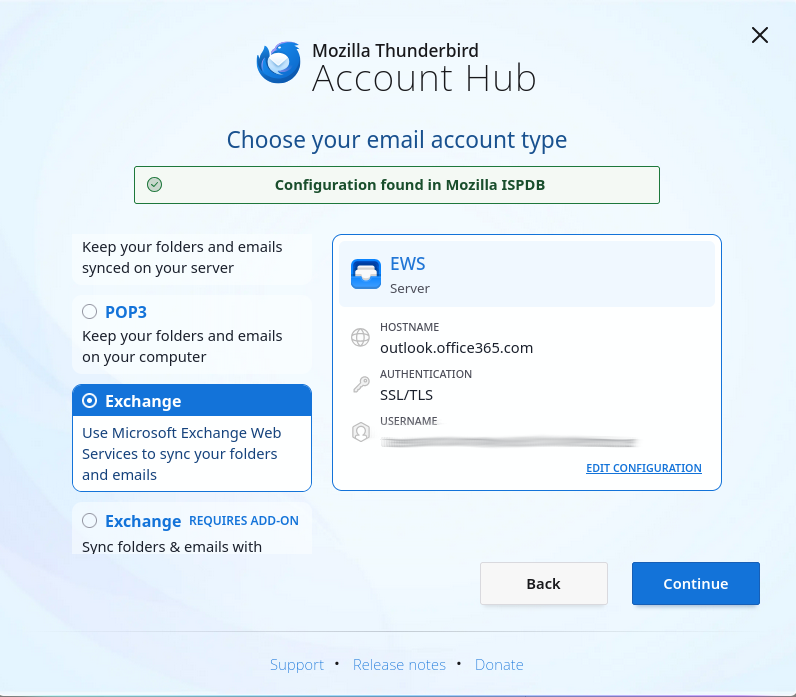
If your organization uses Microsoft Exchange-based email, you’ll be happy to hear that Thunderbird’s latest monthly Release version 145, now officially supports native access via the Exchange Web Services (EWS) protocol. With EWS now built directly into Thunderbird, a third-party add-on is no longer required for email functionality. Calendar and address book support for Exchange accounts remain on the roadmap, but email integration is here and ready to use!

What changes for Thunderbird users

Until now, Thunderbird users in Exchange hosted environments often relied on IMAP/POP protocols or third-party extensions. With full native Exchange support for email, Thunderbird now works more seamlessly in Exchange environments, including full folder listings, message synchronization, folder management both locally and on the server, attachment handling, and more. This simplifies life for users who depend on Exchange for email but prefer Thunderbird as their client.

How to get started

For many people switching from Outlook to Thunderbird, the most common setup involves Microsoft-hosted Exchange accounts such as Microsoft 365 or Office 365. Thunderbird now uses Microsoft’s standard sign-in process (OAuth2) and automatically detects your account settings, so you can start using your email right away without any extra setup.

If this applies to you, setup is straightforward:

  1. Create a new account in Thunderbird 145 or newer.
  2. In the new Account Hub, select Exchange (or Exchange Web Services in legacy setup).
  3. Let Thunderbird handle the rest!

Important note: If you see something different, or need more details or advice, please see our support page and wiki page. Also, some authentication configurations are not supported yet and you may need to wait for a further update that expands compatibility, please refer to the table below for more details.Β 

What functionality is supported now and what’s coming soon

As mentioned earlier, EWS support in version 145 currently enables email functionality only. Calendar and address book integration are in active development and will be added in future releases. The chart below provides an at-a-glance view of what’s supported today.

Feature areaSupported nowNot yet supported
Email – account setup & folder accessβœ… Creating accounts via auto-config with EWS, server-side folder manipulation –
Email – message operationsβœ… Viewing messages, sending, replying/forwarding, moving/copying/deleting–
Email – attachmentsβœ… Attachments can be saved and displayed with detach/delete support.–
Search & filteringβœ… Search subject and body, quick filtering❌ Filter actions requiring full body content are not yet supported.
Accounts hosted on Microsoft 365βœ… Domains using the standard Microsoft OAuth2 endpoint❌ Domains requiring custom OAuth2 application and tenant IDs will be supported in the future.
Accounts hosted on-premiseβœ… Password-based Basic authentication❌ Password-based NTLM authentication and OAuth2 for on-premise servers are on the roadmap.
Calendar supportβ€“βŒ Not yet implemented – calendar syncing is on the roadmap.
Address book / contacts supportβ€“βŒ Not yet implemented – address book support is on the roadmap.
Microsoft Graph supportβ€“βŒ Not yet implemented – Microsoft Graph integration will be added in the future.

Exchange Web Services and Microsoft Graph

While many people and organizations still rely on Exchange Web Services (EWS), Microsoft has begun gradually phasing it out in favor of a newer, more modern interface called Microsoft Graph. Microsoft has stated that EWS will continue to be supported for the foreseeable future, but over time, Microsoft Graph will become the primary way to connect to Microsoft 365 services.

Because EWS remains widely used today, we wanted to ensure full support for it first to ensure compatibility for existing users. At the same time, we’re actively working to add support for Microsoft Graph, so Thunderbird will be ready as Microsoft transitions to its new standard.

Looking ahead

While Exchange email is available now, calendar and address book integration is on the way, bringing Thunderbird closer to being a complete solution for Exchange users. For many people, having reliable email access is the most important step, but if you depend on calendar and contact synchronization, we’re working hard to bring this to Thunderbird in the near future, making Thunderbird a strong alternative to Outlook.

Keep an eye on future releases for additional support and integrations, but in the meantime, enjoy a smoother Exchange email experience within your favorite email client!


If you want to know more about Exchange support in Thunderbird, please refer to the dedicated page on support.mozilla.org. Organization admins can also find out more on the Mozilla wiki page. To follow ongoing and future work in this area, please refer to the relevant meta-bug on Bugzilla.

The post Thunderbird Adds Native Microsoft Exchange Email Support appeared first on The Thunderbird Blog.

Welcoming New Faces to the Thunderbird Community Team

Community First

Thunderbird is (and has always been) powered by the people. The project exists because of the amazing community of passionate code contributors, bug-bashers, content creators, and all-around wonderful humans who have stood behind it and worked to support and maintain it over the years.

And as the Thunderbird community grows, we want to ensure that we [the team supporting you] grow alongside you, so that we can continue to collaborate and build effectively and efficiently together.Β 

That’s why we’re thrilled to announce a refreshed and growing Thunderbird Community Team here at MZLA! Expect a little more structure, a lot more collaboration, and an open invitation to our users and contributors to join us and help shape what comes next.

Meet the Team

Whether you’re filing your first bug, searching for support, writing documentation, or just dropping into Matrix to say hi, this is the team working hard behind the scenes to make sure your experience is productive, constructive, and superconductive:

Michael Ellis | Manager of Community Programs

Hey there! I’m Michael, and I’m joining the Thunderbird family as Manager of Community Programs to help grow and support our awesome community. I’ll be working on programs that help improve contributor pathways and make it easier for more people to get involved in the work we do and the decisions we make on a day-to-day basis.

I come from a background of managing developer communities and running large-scale programs at organizations like Mozilla, Ionic, and NXP Semiconductors. I believe open-source communities are strongest when they’re welcoming, engaging, and well-supported. I like gifs and memes very much.Β 

I look forward to seeing you in the Thunderbird community and saying hello to one another on Matrix!Β Β 

Until then, Keep on Rocking the Free Web!

Wayne Mery | Senior Community Manager

Greetings everyone.Β  Wayne here, also known as wsmwk.Β  I have used open source for forty years, been a user of and contributor to Thunderbird for twenty years, and am a founding member of the Thunderbird Council, and have run several of the council elections.Β 

I love to mentor and connect to our community members who assist Thunderbird users in Reddit, Connect, matrix (chat), bugzilla, github, topicbox forums, Thunderbird support in SUMO (SUpport MOzilla), and other venues.Β  And I help manage these venues and assist users, to bring the concerns of the user community to developers.Β  I also assist in developing content for users (including knowledge base articles in SUMO) and assist in our general communications with users.Β Β 

There are many ways you can participate in small ways or large, including through praise or constructive feedback through the venues listed above and those listed on our participate web page – I encourage you to do so at your convenience. And I look forward to connecting with you soon.Β 

Heather Ellsworth | Senior Developer Relations Engineer

Hi everyone! *waves*

I’ve been part of the Thunderbird family for nearly two years, working with the awesome Desktop team. Now, I’m thrilled to be joining the Community team, led by Michael, where I’ll be focusing on initiatives to support and grow our amazing contributor community.

My work will include creating helpful video content to make it easier for folks to get started, as well as improving our technical documentation at source-docs.thunderbird.net and developer.thunderbird.net.

If you’re interested in contributing or need help getting started, don’t hesitate to reach out to me on Matrix β€” I’d love to chat!

What’s the Road Ahead?

Community is at the heart of everything Thunderbird does. As our product continues to evolve and improve, we want our community experience to keep pace with that growth. This means not only working to keep Thunderbird open, but striving towards better contributor pathways, clearer communication, and more opportunities to participate.

We’re here to listen, collaborate, and help you succeed. You can expect to see more initiatives, experiments, and outreach from us soon, but you don’t have to wait till then to weigh in.

Have thoughts or suggestions? Drop a comment below to share them directly, or visit our Connect thread to see what others are saying and add your own ideas there. Together, we can help shape the future of the Thunderbird community and product.

After all, Thunderbird is powered by the people, & that includes you.

The post Welcoming New Faces to the Thunderbird Community Team appeared first on The Thunderbird Blog.

❌