
FreshRSS

🔒
❌ About FreshRSS
There are new articles available, click to refresh the page.
Before yesterdaySoftware

Your Workflow, Supercharged

24 October 2025 at 23:00

Extensions make Thunderbird truly yours, moving at your pace and reflecting your priorities. Thunderbird’s flexibility means you can tailor the app to how you actually work. We’ll cover tools for efficiency, consistency, and visibility so every send is faster and better informed, your future self will thank you.

Clippings

We’ve all been there, retyping the same line for the hundredth time and wondering if there’s a better way. Clippings lets you save text once and reuse it anywhere you compose in Thunderbird. You can organize by folders, apply color labels, and search by name with autocomplete, so the right text is always a couple of keystrokes away.

When you paste a clipping, you can include fill‑in prompts for names, dates, or custom notes, and even keep simple HTML formatting and images when needed. It’s like a spellbook for your inbox–summon, swap, send. 

Below is a quick glance at how Clippings can help you: 

  • Save and paste reusable snippets anywhere you write—no more repeat typing.
  • Include prompts for names, dates, or custom notes; HTML and inline images.
  • Organize with folders and labels; find snippets fast with autocomplete.
  • Paste instantly with keyboard shortcuts; import, export, or sync your library.
Link to Thunderbird Add-on library.


With the content process streamlined, now for a sign‑off that keeps your tone on track.

Signature Switch

We rotate hats as we write: buttoned‑up for clients, warm for teammates, and careful punctuation for legal. Signature Switch helps you with that. Keep multiple signatures, and swap them in with a click or shortcut right from the composer. Turn a signature off entirely, pick from your saved set, or append a different one without retyping a thing.

Use plain text for simplicity, or HTML with images and links for a more professional finish. Because everything is accessible while you write, choosing the right signature doesn’t break your flow—and it helps keep branding and tone consistent across messages. One click and your signature goes from handshake to high‑five.

Below is a quick glance at how Signature Switch can help you: 

  • Switch signatures on/off or choose from your saved set, no retyping.
  • Match by recipient, account, or context; keep tone aligned.
  • Use plain text or polished HTML with images and links.
  • Access quickly from the composer toolbar or menu while you write.
Link to Thunderbird Add-on library.


With the sign‑off sorted, now let’s measure the results.

ThirdStats

Looking for a way to interpret email trends on more than just vibes alone? ThirdStats turns your mailbox into clear, local analytics that reveal how your email work actually behaves, when volume spikes, which hours are busiest, how response times trend, and which folders see the most activity. Interactive charts make patterns easy to spot at a glance. 

You can compare accounts side by side, adjust date ranges to see changes over time, and focus on a specific folder for deeper context. All processing happens on your device with read‑only access, so your data isn’t transmitted elsewhere. It’s a simple, private way to understand your workload and time your effort better. 

Below is a quick glance at how ThirdStats can help you: 

  • Visualize volume, peak hours, response times, and folder activity with interactive charts.
  • Compare accounts side by side; filter by date ranges; view by folder.
  • Keep it private: analysis runs locally with read‑only access, no external transmission.
Link to Thunderbird Add-on library.


Do you have a favorite extension? Share it with us in the comments below.

To learn more about add-ons check out Maximize Your Day: Extend Your Productivity with Add-ons.

Your workflow deserves a client that adapts to it. Add what accelerates you, trim the rest, and keep improving. When you’re ready to go further, the Thunderbird Add-ons Catalog is the fastest path to new features. Check what’s popular, discover up‑and‑coming tools, and install directly from the page with built‑in version compatibility checks. Thanks for reading.

The post Your Workflow, Supercharged appeared first on The Thunderbird Blog.
Thunderbird Monthly Release 142 Recap

28 August 2025 at 16:43

We’re back with another exciting Monthly Release recap! Thunderbird 142.0 brings a host of user-requested features and important bug fixes that make your email experience smoother and more reliable. From better folder management to smarter PDF handling, this release focuses on the details that matter most to your daily workflow.

A quick reminder – these updates are for users on our monthly Thunderbird Release channel. For our users still on the ESR (Extended Standard Release) channel, these updates won’t land until next July 2026. For more information on the differences between the channels and how to make the switch:

Now let’s dive into what’s new in 142.0!

New Features:

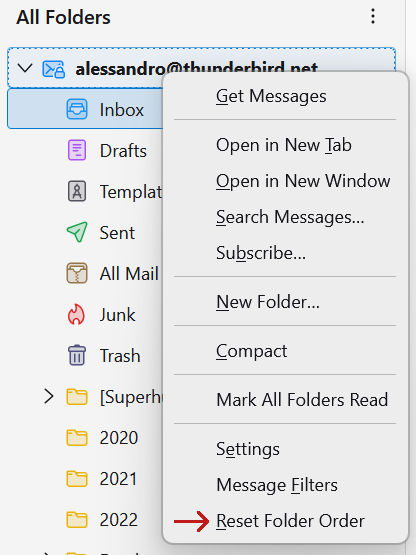
Reset Manual Folder Sorting

Bug 1972710

Ever tweaked your folder order and wished you could start fresh? We hear you! Thunderbird 142 introduces a simple way to reset your folder sorting back to defaults. 

Benefits:

  • The new Reset Folder Order option lets users right‑click an account in the Folder Pane to instantly clear any custom sorting. 
  • Provides a quick clean slate and avoids manually dragging folders back to default positions.

Note: This feature resets sorting order but doesn’t restore folders that were moved inside different parent folders.

PDF Signatures and Attachment Handling

Bug 1970796

Thunderbird now lets you add visual signatures to PDF attachments opened inside the app. This update brings Thunderbird in line with modern PDF functionality, making it easier to handle contracts, forms, and other documents without leaving your inbox.

Benefits:

  • Add a handwritten-style visual signature directly in Thunderbird.
  • No need for external tools to sign simple PDF documents.
  • Keeps everyday document handling faster and more convenient.

Custom OAuth Support for Add-on developers

Bug 1967370

New add-on API support for OAuth client registration now allows developers and organizations to add custom OAuth providers at runtime. Instead of requiring changes in Thunderbird’s core code, an add-on can handle the setup. 

Benefits:

  • Supports custom OAuth providers through add-ons.
  • Works with enterprise policies for organizational deployments.
  • Simplifies integration with unique authentication systems.

Bug Fixes

Respect for “Do Not Disturb”

Bug 1876310

Your focus time is sacred, and Thunderbird now honors that across all operating systems.

Benefits:

  • Native OS notifications now respect the “Do Not Disturb” setting of every operating system, including blocking calendar reminders and chat notification sounds.
  • Delivers protected focus time and consistent behavior with other applications.

Improved Dark Reader Mode Toggle

Bug 1962931

Reading flow is now smoother when switching between light and dark message modes.  An issue was reported where toggling the setting in the message header would reset your scroll position and pull focus away from the message body. 

Benefits:

  • Keep your scroll position in the message when switching between light and dark mode so you can continue reading without interruption.
  • Retain focus on the message body for easier keyboard navigation.
  • Reduce extra clicks and scrolling, making reading more seamless.

Message List Scrolling Fix

Bug 1968967

Unwanted scrolling of the message list that happened when returning to the Mail tab after opening a message is now a thing of the past. Instead of jumping to the top and slowly scrolling back down, the list now stays put.

Benefits:

  • Keep your place in the message list when switching tabs.

PDF Attachments Reload Correctly on Startup

Bug 1970615

Thunderbird now correctly reloads PDF attachments that were left open in tabs when you restart the app. Previously, these tabs would fail to open and display an error, forcing you to reload them manually.

Benefits:

  • Open PDF attachments are restored automatically on startup.
  • No more error messages when resuming work.

The post Thunderbird Monthly Release 142 Recap appeared first on The Thunderbird Blog.

Monthly Release 141 Recap

We’re launching a brand new series that will highlight features and improvements with Thunderbird 141.0 – your front row ticket to Thunderbird’s monthly enhancements! (No more waiting in the wings so to speak). Learn what’s new, why it matters, and how it’ll transform your inbox experience.

In March, we introduced a new monthly Release channel and swapped it as the default option on the Thunderbird.net downloads page.

As a quick refresher, Thunderbird now offers two core release channel options:

  1. Release Channel: Updated monthly with new features, performance boosts, and bug fixes as they land.
  2. ESR (Extended Support Release): Receives all of the above in one major annual update, focusing on stability, with point security and stability patches in between.

While both versions are equally stable, the Release channel provides faster access to cutting-edge tools and optimizations, while the ESR channel may provide more stability when using add-ons with Thunderbird.

Feedback on the Release channel has been overwhelmingly positive, with many users transitioning from ESR. To join them:

Now that we’ve gotten the formalities out of the way, let’s jump in to what’s new in 141.0!

New Features

Warning for Expiring PGP Keys

Thunderbird loves PGP like cats adore cardboard boxes! We prioritize user trust by making end-to-end encrypted email simple for everyone, from newcomers to experienced users. To help you get started or refresh your knowledge, our team and volunteers have written an excellent introduction to the topic, as well as a How-to and FAQ.

Key expiration serves as a security safeguard, requiring proactive renewal procedures that reinforce operational encryption competencies.

What changed:

  • Your warning light is lit: If your public key expires in 31 days, Thunderbird now flashes a red alert in the compose window. No post-expiry panic!

Why it matters:

  • Safety net: A key that auto-expires nudges you to refresh it.
  • Piece of mind: Before Thunderbird told you after-the-fact your key died. Now? Your inbox is proactive.

Archive from OS Notifications

The improvements to native notifications keep coming. Now, in addition to deleting a message, marking it as spam, or starring it, you can archive a message directly from your operating system’s notifications. 

By default, the notifications you see include “Mark as Read” and “Delete”, however they can be customized further by going to Thunderbird Settings → General→ Incoming Mails and clicking on Customize.

Here you can select the information you want to see in your notification, as well as the actions you’d like to perform with it.

What changed:

  • New mail notifications have added the ‘Archive’ action.

Why it matters:

  • No need to go into the Thunderbird app to archive an incoming email now. More actions in notifications give you time to do the things you want, instead of managing your inbox.

Bug Fixes

Prioritize Link Hover URL in Status Bar

Thunderbird includes numerous features to protect you from suspicious mail and bad actors. One of these tools involves checking the URL of a link by hovering your mouse over the link text. The status bar would display the link URL, but it could be overwritten in fractions of a second by “Downloading message” and “Opening folder” messages. We’ve fixed this, and now the URL you’re hovering over will get priority in the status bar.

What changed:

  • Hovering over a link in an email will display it in the status bar without being immediately overwritten by other messages.

Why it matters:

  • Knowing where an email wants to send you is a major security boost, especially with the widespread threat of phishing emails.

Dots, Dashes, and Advanced Address Book Search

Three months ago, a community member noted that while the CardBook add-on could find phone numbers that used dots for separators, the Advanced Address Book Search in Thunderbird could not. Since we want users to be able to find contacts, and use the phone number formatting they want as well, we’ve built this ability into Thunderbird.

What changed:

  • The advanced address book in Thunderbird now recognizes phone numbers that use dots for separators.

Why it matters:

  • Saves time: Finds contacts faster and more accurately, no matter their format or storage location, eliminating need for manual cleanup or repeat searches.

Performance Improvements

Message List Scroll

To address message list scrolling performance, we adjusted how new rows are rendered but inadvertently introduced display delays. We’re reverting to the original row-handling method to properly assess performance impact before considering this change for Extended Support Release adoption. This allows precise measurement of optimizations against potential trade-offs, ensuring reliable performance in production environments.

What changed:

  • Reverting back to the previous method for how rows are updated.

Why it matters:

  • To accurately measure how the update affects scrolling performance before considering inclusion in an ESR.

The post Monthly Release 141 Recap appeared first on The Thunderbird Blog.

❌